Ignition fallback module
The Ignition fallback is a module used as a fallback to trip detection when OBD data is not available (not available on a vehicle or deactivated in the device configuration).
Using this module will allow the Ignition state’s trip detection to be based on movement and external voltage.
Advantages and Drawbacks
● Advantages
At the end of each trip, you will have journey data
Fields impacted by the ignition remain the same (DIO_IGNITION and fields related to vehicle state or journey state), the only difference is the logic to simulate the ignition state.
● Drawbacks
Tow away is not detected.
Too long idling may cause early end of trip, and a new trip will be created.
When will-you need to apply the module’s configuration?
To further understand the ignition fallback module and when to apply it, two cases are exhibited below explaining different scenarios and whether the module should and shouldn't be used.
Before starting the example cases let’s have a look at MDI_VEHICLE_STATE field description, the pattern is always “from:to”:
- Journey On (0)
- Journey Off (1)
- Idling (2)
- Tow away (3)
Let’s consider we have 2 cars, one Diesel and the other is electric.
● Car 1: Diesel car
By monitoring the DIO_IGNITION field that detects the car’s ignition state, the device is able to recognize a start/end of a journey (MDI_JOURNEY_* will be sent at the beginning and the end of a trip) with the current car’s state (MDI_VEHICLE_STATE).
In normal cases, you should have MDI_VEHICLE_STATE with 1:0 which means going from a journey off to a journey on, and during the trip the value can be switched from 2:0 and 0:2 which means respectively coming and going from an idling state.
To detect the end of a trip generally, you will need to have MDI_VEHICLE_STATE with 0:1 or 2:1. By this you will have all MDI_JOURNEY_* related fields sent too. You can also have 1:3 or 3:1 that helps us know that the car is being towed. for the above mentioned case, the Ignition Fallback mode is not needed.
● Car 2: Electric car
The Electric car doesn’t have a voltage peak nor OBD protocols that allows the detection of the car’s ignition, that’s why we won’t receive DIO_IGNITION as true at the beginning of the trip. So this will affect also the MDI_VEHICLE_STATE , you will have only 1:3 and 3:1 which means the car is being towed.
This will affect all the MDI_JOURNEY_* data, that’s why it’s recommended to use the Ignition Fallback mode configuration in this case.
How to activate the configuration
1. In the Device Manager https://dashboard.munic.io, go to:
-> Configuration ->Ignition Fallback mode -> Choose your version
If the module isn’t available in your account, please contact the support team.
2. Fill in the form, and don’t forget to check Solution Activation
Version 2.02

The ignition ON Delay: Movement analysis delay to consider an Ignition ON.
The ignition OFF Delay: Movement analysis delay to consider an Ignition OFF.
Version 2.08
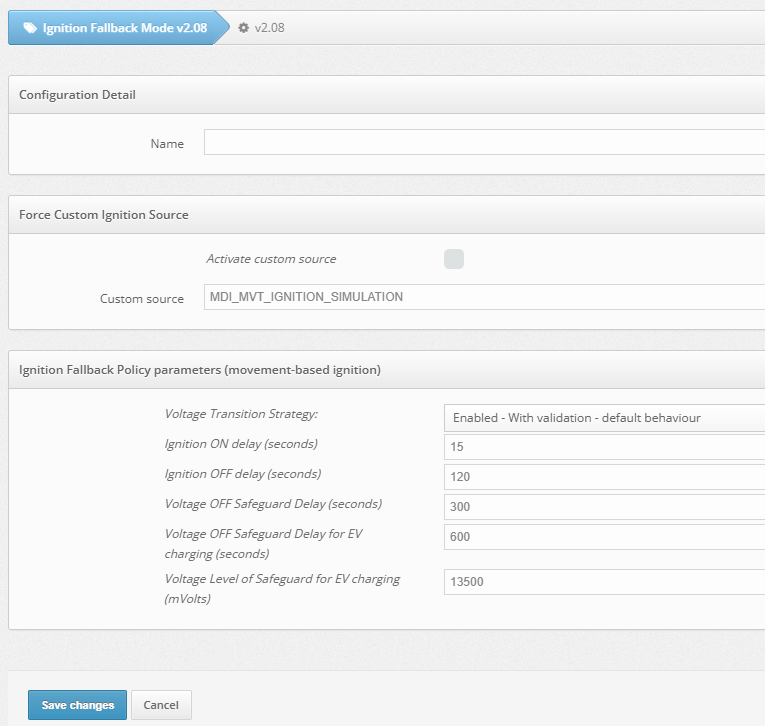
Custom Source Option:
Activating the custom source tells the device to stop waiting for a physical OBD signal and instead trust the mathematical Fallback of Munic state machine to declare when a trip starts and ends. Please do not change the settings whitout reaching out to our support team
Voltage Transition Strategies Options:
- Disabled The device completely ignores the vehicle's electrical system (voltage changes) when trying to figure out if the engine is on or off. It will rely entirely on other methods (for example movement-based, RPM, etc.) to detect a trip.
- Enabled - Without validation The device relies strictly on voltage changes to dictate the ignition state. For example, if it detects a voltage spike (typically caused by an alternator starting), it immediately declares the ignition is ON. It does not double-check this assumption against movement or GPS data. This can sometimes lead to false trips if the vehicle's battery voltage fluctuates while parked.
- Enabled - With validation - default behaviour Voltage triggers a state change, but it must be confirmed by the movement/RPM state machine. This is the safest standard setting to prevent false trips.
- Enabled - With validation & safeguard (workaround) Adds timers (like the 300-second Voltage OFF Safeguard Delay) to prevent false stops from smart alternators dropping voltage during a drive.
- Enabled - With validation & safeguard for EV charging (workaround) Adds a specific voltage threshold (13500 mVolts) and a longer timer (600 seconds) so the device doesn't mistake a charging cable being plugged in for a new journey starting.
Delays:
Please do not change the settings whitout reaching out to our support team
3. After saving the changes, go to:
Campaign
Add a configuration campaign -> Fill in the form, by searching the configuration name.

4. You will be redirected to home campaigns page, click on Launch.

5. You can monitor the campaign progress, by clicking on Show details.
